


软件简介:
文件蜈蚣是一个全能网络文件上传/下载器, BitTorrent客户端, WebDAV客户端, FTP客户端, 和SSH客户端.
它快速, 可定制, 用户友好, 多协议支持, 同时也包含了很多有用的辅助工具如: HTTP请求器, 文件合并工具, 编码/解码工具等和网页浏览器进行集成, 你可以从网页上下载音频和视频, 甚至是加密视频.(这是免费的,并且没有广告)
功能特性:
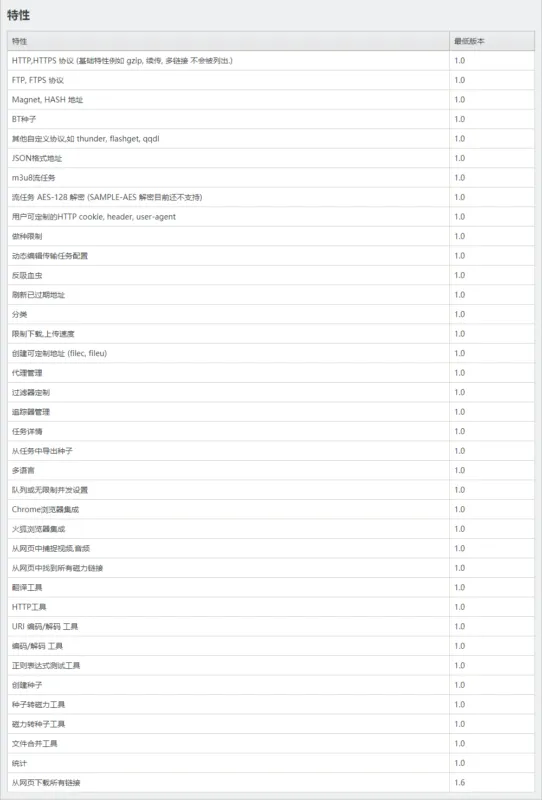
支持多协议下载:HTTP,HTTPS , FTP, FTPS, Magnet, HASH, BT种子, 其他自定义协议,如 thunder, flashget, qqdl, JSON格式地址, m3u8流任务等等
包含多辅助工具:HTTP工具,URI 编码/解码 工具,创建种子,种子转磁力工具,磁力转种子工具,文件合并工具等
更多特性可以查看文章底部页第一图
更新日志:
2.82
New:
Fully shutdown.
Fixed:
When the remote HTTP server sends error data without disconnecting, causing this segment of data not to be downloaded and the final file size to not match the remote one, this scenario is likely to occur when the remote connection is unstable or frequently switches proxy IPs.
When downloading a file from the file browser, the file save path follows the catalog instead of the user choosing one.
The browser extension gets the wrong cookies from the incognito window.
Changes:
Change the default parallel option to “Fastest”.
FileCXX private DHT network module (libdybn) has been removed, using BitTorrent public DHT network as the alternate.
http://www.filecxx.com/zh_CN/update_log.html
下载地址:
该软件现在免费但需要激活码可以点击以下链接获取,也可以去给作者项目点击个小星星早日解除限制。
软件官网:https://www.filecxx.com
激活码:http://www.filecxx.com/zh_CN/activation_code.html
Github:https://github.com/filecxx/FileCentipede
截图预览:
![图片[1]-增强型网络文件下载器 文件蜈蚣 | FileCentipede(2.82)-软件工具箱](https://www.rjgjx.com/wp-content/uploads/2026/05/20260528021427753-jk9jUI.webp)
![图片[2]-增强型网络文件下载器 文件蜈蚣 | FileCentipede(2.82)-软件工具箱](https://www.rjgjx.com/wp-content/uploads/2026/05/20260528021430768-jk9qDH.webp)
![图片[3]-增强型网络文件下载器 文件蜈蚣 | FileCentipede(2.82)-软件工具箱](https://www.rjgjx.com/wp-content/uploads/2026/05/20260528021433298-jk9o8K.webp)
![图片[4]-增强型网络文件下载器 文件蜈蚣 | FileCentipede(2.82)-软件工具箱](https://www.rjgjx.com/wp-content/uploads/2026/05/20260528021435962-jk97vD.webp)
文中介绍的软件版权归原作者所有,资源来源于互联网公开渠道,不对软件做任何修改或破解。
因使用本站介绍的软件产生的任何问题,请自行联系软件官方客服处理。













![表情[xiaoku]-软件工具箱](https://www.rjgjx.com/wp-content/themes/zibll/img/smilies/xiaoku.gif)
暂无评论内容